Notifications
Vortex provides a flexible notification system that sends updates across multiple channels when deployments occur.
Notifications are triggered automatically during deployment to a hosting environment.
Channels
Configure notification channels in your .env file:
# Enable notification channels (comma-separated list)
VORTEX_NOTIFY_CHANNELS=email,slack,github
Available channels: diffy, email, github, jira, newrelic, slack, webhook
Global environment variables
These variables apply to all notification channels unless overridden by channel-specific settings.
| Variable | Required | Default | Location | Description |
|---|---|---|---|---|
VORTEX_NOTIFY_CHANNELS | No | email | .env | Notification channels (comma-separated) |
VORTEX_NOTIFY_PROJECT | No | VORTEX_PROJECT | .env | Notification project name |
VORTEX_NOTIFY_SKIP | No | Hosting | Set to 1 to skip notifications |
Deployment context variables
These variables provide deployment context information used by notification channels. They must be set by the hosting environment before calling the notification script.
| Variable | Required | Description |
|---|---|---|
VORTEX_NOTIFY_BRANCH | Yes | Git branch name |
VORTEX_NOTIFY_SHA | Yes | Git commit SHA |
VORTEX_NOTIFY_PR_NUMBER | No | Pull request number (empty for branch deployments) |
VORTEX_NOTIFY_LABEL | Yes | Human-readable deployment label |
Branch filtering
Each notification channel can be restricted to specific branches using
a VORTEX_NOTIFY_<CHANNEL>_BRANCHES variable. When set, the channel
only sends notifications for deployments on the listed branches
(comma-separated, exact match). When empty or unset, the channel runs
on all branches.
For example, to restrict New Relic notifications to only main and staging:
VORTEX_NOTIFY_NEWRELIC_BRANCHES=main,staging
New Relic defaults to main,master,develop. All other channels default to no filter.
Message templates and tokens
Most notification channels support customizable message templates using replacement tokens:
| Token | Description | Example |
|---|---|---|
%project% | Project name | My Project |
%label% | Deployment label | main or PR-123 |
%timestamp% | Current timestamp | 15/11/2025 14:30:45 UTC |
%environment_url% | Environment URL | https://example.com |
%login_url% | Login URL | https://example.com/user/login |
%deployment_log% | Collected deployment logs, when enabled |
Default message template:
## This is an automated message ##

Site %project% %label% has been deployed at %timestamp% and is available at %environment_url%.

Login at: %login_url%
Deployment log
Deployment logs are collected from a shared directory and included in
notifications. Each producing script writes its own <name>.log into
VORTEX_NOTIFY_LOG_DIR - vortex-provision writes provision.log when
VORTEX_PROVISION_LOG=1, truncated fresh each run - and when VORTEX_NOTIFY_LOG=1
the notifier collects every log in that directory, each as its own titled section,
and the email, Slack, JIRA, and webhook channels add them to their
message. The email and webhook message templates expose the collected logs as the
%deployment_log% token; Slack adds them to the message attachment and JIRA as a
comment code block. Any future script that drops a <name>.log into the directory
is collected automatically.
To include the provision log in notifications, set both VORTEX_PROVISION_LOG=1
and VORTEX_NOTIFY_LOG=1 (in .env or per environment). A single channel can be
turned off with VORTEX_NOTIFY_<CHANNEL>_LOG=0 (for example
VORTEX_NOTIFY_SLACK_LOG=0).
Deployment logs are included verbatim. Make sure producing scripts do not print secrets, and enable the feature only for the channels and environments where exposing the full logs is acceptable.
| Variable | Required | Default | Location | Description |
|---|---|---|---|---|
VORTEX_PROVISION_LOG | No | 0 | .env or Hosting | Set to 1 to write the provision log for collection |
VORTEX_NOTIFY_LOG | No | 0 | .env or Hosting | Set to 1 to collect and include deployment logs |
VORTEX_NOTIFY_LOG_DIR | No | /tmp/vortex-logs | .env | Directory the logs are collected from |
Email
Send deployment notification via email.
Setup
- Add
VORTEX_NOTIFY_EMAIL_FROMvariable to.envfile with the sender email address. - Add
VORTEX_NOTIFY_EMAIL_RECIPIENTSvariable to.envfile with recipients in formatemail|name(comma-separated for multiple).
Environment variables
| Variable | Required | Default | Location | Description |
|---|---|---|---|---|
VORTEX_NOTIFY_EMAIL_FROM | Yes | .env | Sender email address | |
VORTEX_NOTIFY_EMAIL_RECIPIENTS | Yes | .env | Recipients (format: email|name) | |
VORTEX_NOTIFY_EMAIL_PROJECT | No | VORTEX_NOTIFY_PROJECT | .env | Project name for email |
VORTEX_NOTIFY_EMAIL_MESSAGE | No | Default template | .env | Custom message template |
VORTEX_NOTIFY_EMAIL_BRANCHES | No | .env | Restrict to specific branches (comma-separated) |
GitHub
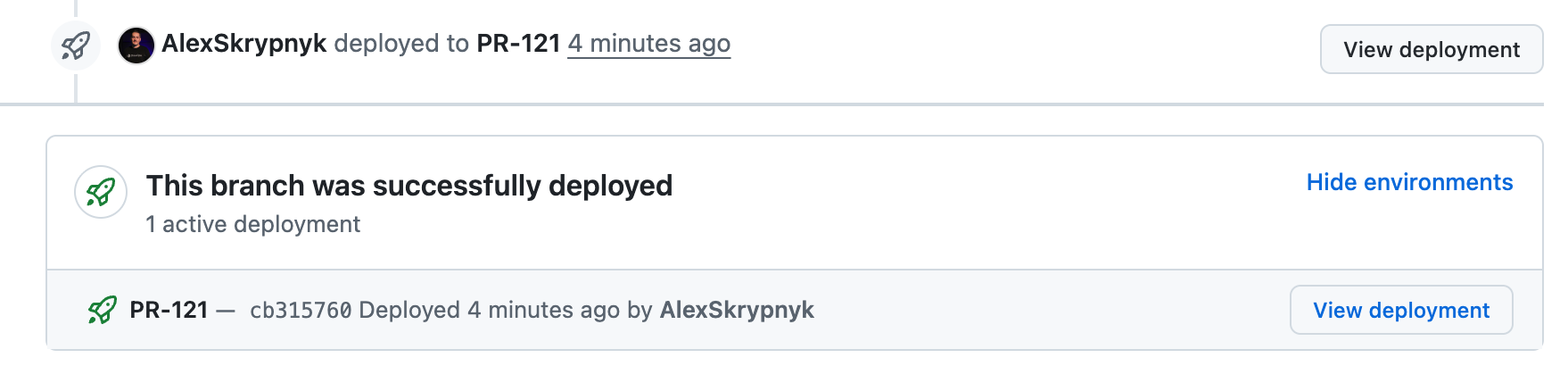
Post deployment status to GitHub pull requests.
Setup
- Create a GitHub personal access token.
- Add
VORTEX_NOTIFY_GITHUB_TOKENto your hosting provider's environment variables. - Add
VORTEX_NOTIFY_GITHUB_REPOSITORYto your hosting provider's environment variables.
Environment variables
| Variable | Required | Default | Location | Description |
|---|---|---|---|---|
VORTEX_NOTIFY_GITHUB_TOKEN | Yes | Hosting | GitHub personal access token | |
VORTEX_NOTIFY_GITHUB_REPOSITORY | Yes | Hosting | Repository in owner/repo format | |
VORTEX_NOTIFY_GITHUB_ENVIRONMENT_TYPE | No | ${VORTEX_NOTIFY_LABEL} | .env | Environment name (defaults to label, e.g. PR-123) |
VORTEX_NOTIFY_GITHUB_BRANCHES | No | .env | Restrict to specific branches (comma-separated) |
Example
The pull request page shows deployment status with a View deployment button to quickly access the deployed environment.
JIRA
Post a deployment comment and optionally update issue status and assignee.
Setup
- Create a JIRA API token.
- Add
VORTEX_NOTIFY_JIRA_TOKENto your hosting provider's environment variables. - Add
VORTEX_NOTIFY_JIRA_USER_EMAILto your.envfile.
Environment variables
| Variable | Required | Default | Location | Description |
|---|---|---|---|---|
VORTEX_NOTIFY_JIRA_TOKEN | Yes | Hosting | JIRA API token | |
VORTEX_NOTIFY_JIRA_USER_EMAIL | Yes | .env | JIRA user email | |
VORTEX_NOTIFY_JIRA_PROJECT | No | VORTEX_NOTIFY_PROJECT | .env | Project name |
VORTEX_NOTIFY_JIRA_MESSAGE | No | Default template | .env | Custom message template |
VORTEX_NOTIFY_JIRA_ASSIGNEE_EMAIL | No | .env | Assignee email after deployment | |
VORTEX_NOTIFY_JIRA_TRANSITION | No | .env | Transition name (e.g., "In Review") | |
VORTEX_NOTIFY_JIRA_ENDPOINT | No | https://jira.atlassian.com | .env | JIRA API endpoint |
VORTEX_NOTIFY_JIRA_BRANCHES | No | .env | Restrict to specific branches (comma-separated) |
Issue key extraction
The notification system automatically extracts JIRA issue keys from the
deployment label using the pattern [A-Za-z0-9]+-[0-9]+:
feature/PROJ-123-add-feature→PROJ-123feature/PRJ-456-fix-auth→PRJ-456
New Relic
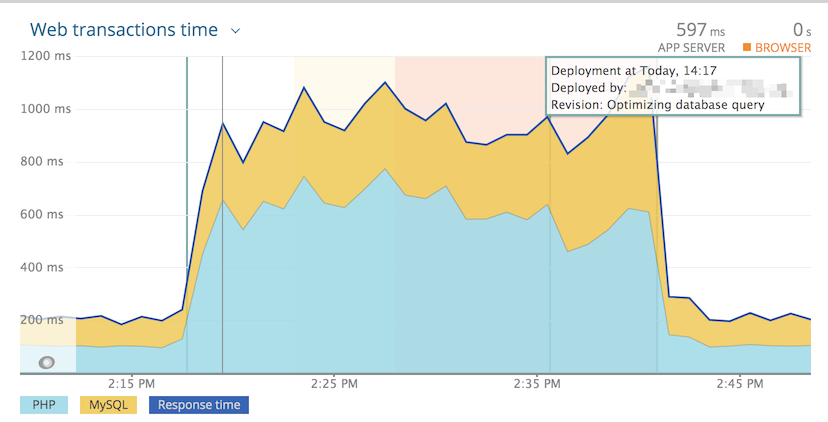
Create deployment markers in New Relic APM to track code changes alongside performance data.
Setup
- Create a New Relic User API Key
(format:
NRAK-XXXXXXXXXXXXXXXXXXXXXX). - Add
NEWRELIC_ENABLED(orVORTEX_NOTIFY_NEWRELIC_ENABLED) to hosting environment variables for environments where New Relic is configured. - Add
VORTEX_NOTIFY_NEWRELIC_USER_KEYto your hosting provider's environment variables.
Set NEWRELIC_ENABLED=true only in environments where New Relic APM is configured
(typically production and staging). This avoids API calls and potential errors
in development or feature branch environments.
Environment variables
| Variable | Required | Default | Location | Description |
|---|---|---|---|---|
VORTEX_NOTIFY_NEWRELIC_ENABLED | Yes | NEWRELIC_ENABLED | Hosting | Enable New Relic notifications |
VORTEX_NOTIFY_NEWRELIC_USER_KEY | Yes | Hosting | New Relic User API Key | |
VORTEX_NOTIFY_NEWRELIC_PROJECT | No | VORTEX_NOTIFY_PROJECT | .env | Project name |
VORTEX_NOTIFY_NEWRELIC_APP_NAME | No | Auto-generated | .env | Application name |
VORTEX_NOTIFY_NEWRELIC_DESCRIPTION | No | Default template | .env | Deployment description |
VORTEX_NOTIFY_NEWRELIC_CHANGELOG | No | Description | .env | Deployment changelog |
VORTEX_NOTIFY_NEWRELIC_USER | No | Deployment robot | .env | User performing deployment |
VORTEX_NOTIFY_NEWRELIC_ENDPOINT | No | https://api.newrelic.com/v2 | .env | API endpoint |
VORTEX_NOTIFY_NEWRELIC_BRANCHES | No | main,master,develop | .env | Restrict to specific branches (comma-separated) |
Example
Slack
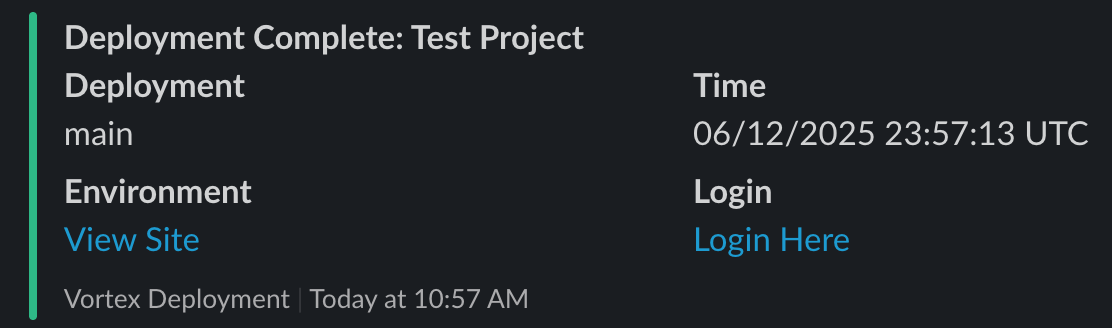
Post deployment notifications to a Slack channel.
Setup
- Create a Slack app and Incoming Webhook.
- Add
VORTEX_NOTIFY_SLACK_WEBHOOKto your hosting provider's environment variables.
Environment variables
| Variable | Required | Default | Location | Description |
|---|---|---|---|---|
VORTEX_NOTIFY_SLACK_WEBHOOK | Yes | Hosting | Slack webhook URL | |
VORTEX_NOTIFY_SLACK_PROJECT | No | VORTEX_NOTIFY_PROJECT | .env | Project name |
VORTEX_NOTIFY_SLACK_MESSAGE | No | Default template | .env | Fallback text template |
VORTEX_NOTIFY_SLACK_CHANNEL | No | .env | Target channel (overrides webhook default) | |
VORTEX_NOTIFY_SLACK_USERNAME | No | Deployment Bot | .env | Bot display name |
VORTEX_NOTIFY_SLACK_ICON_EMOJI | No | :rocket: | .env | Bot icon emoji |
VORTEX_NOTIFY_SLACK_BRANCHES | No | .env | Restrict to specific branches (comma-separated) |
Event behavior
Slack notifications are sent for both pre_deployment and post_deployment events:
- Pre-deployment: Gray color with "Deployment Starting" status
- Post-deployment: Green color with "Deployment Complete" status
Example
Webhook
Send HTTP requests to arbitrary webhook URLs.
Setup
- Add
VORTEX_NOTIFY_WEBHOOK_URLto your.envfile or hosting environment variables.
Environment variables
| Variable | Required | Default | Location | Description |
|---|---|---|---|---|
VORTEX_NOTIFY_WEBHOOK_URL | Yes | .env or Hosting | Webhook endpoint URL | |
VORTEX_NOTIFY_WEBHOOK_METHOD | No | POST | .env | HTTP method |
VORTEX_NOTIFY_WEBHOOK_HEADERS | No | Content-Type: application/json | .env | Pipe-separated headers |
VORTEX_NOTIFY_WEBHOOK_PAYLOAD | No | Default template | .env | JSON payload |
VORTEX_NOTIFY_WEBHOOK_RESPONSE_STATUS | No | 200 | .env | Expected HTTP status |
VORTEX_NOTIFY_WEBHOOK_BRANCHES | No | .env | Restrict to specific branches (comma-separated) |
Default payload template
{
  "channel": "Channel 1",
  "message": "%message%",
  "project": "%project%",
  "label": "%label%",
  "timestamp": "%timestamp%",
  "environment_url": "%environment_url%",
  "login_url": "%login_url%"
}
The %message% token expands to the full deployment message with all other tokens replaced.
Diffy
Dispatch a visual regression run against the just-deployed environment via the shipped GitHub Actions workflow.
This channel does not call Diffy directly. It sends a GitHub
repository_dispatch event to the consumer repository; the
test-vr.yml workflow then runs the
actual Diffy comparison and posts the result back to the pull request.
Setup
- Enable visual regression during installation (or ship
test-vr.ymlmanually) - see Visual regression. - Add a GitHub token with
reposcope asVORTEX_NOTIFY_DIFFY_TOKENto the hosting environment (falls back toVORTEX_NOTIFY_GITHUB_TOKEN, thenGITHUB_TOKEN). - Add
diffytoVORTEX_NOTIFY_CHANNELS.
Environment variables
| Variable | Required | Default | Location | Description |
|---|---|---|---|---|
VORTEX_NOTIFY_DIFFY_TOKEN | Yes | VORTEX_NOTIFY_GITHUB_TOKEN, then GITHUB_TOKEN | Hosting | GitHub token with repo scope used to call repository_dispatch |
VORTEX_NOTIFY_DIFFY_REPOSITORY | Yes | VORTEX_NOTIFY_GITHUB_REPOSITORY | Hosting | Repository in owner/repo format |
VORTEX_NOTIFY_DIFFY_SOURCE_ENV | No | production | .env | Diffy source environment used as the baseline (production, staging, development) |
VORTEX_NOTIFY_DIFFY_EVENT_TYPE | No | vr_run | .env | repository_dispatch event type the workflow listens for |
VORTEX_NOTIFY_DIFFY_BRANCHES | No | .env | Restrict dispatch to specific branches (comma-separated). When empty, every deployment dispatches and the workflow gates on PR label |
Event behavior
Diffy dispatch only runs for post_deployment events. pre_deployment is
skipped because the target environment is not yet ready for comparison.